Multiple Wallets? Now You Choose.
This update solves a frustrating Web3 problem that many MoveQuest users have run into.
Previously, if you had multiple wallet browser extensions installed—such as Trust Wallet, SafePal, or MetaMask—one could effectively become the browser’s default Web3 wallet.
That meant the wallet you actually wanted to connect to MoveQuest wasn’t always the one that opened.
In some cases, users had to unpin, disable, or even temporarily remove another wallet extension just to connect to the right wallet.
That’s no longer necessary.
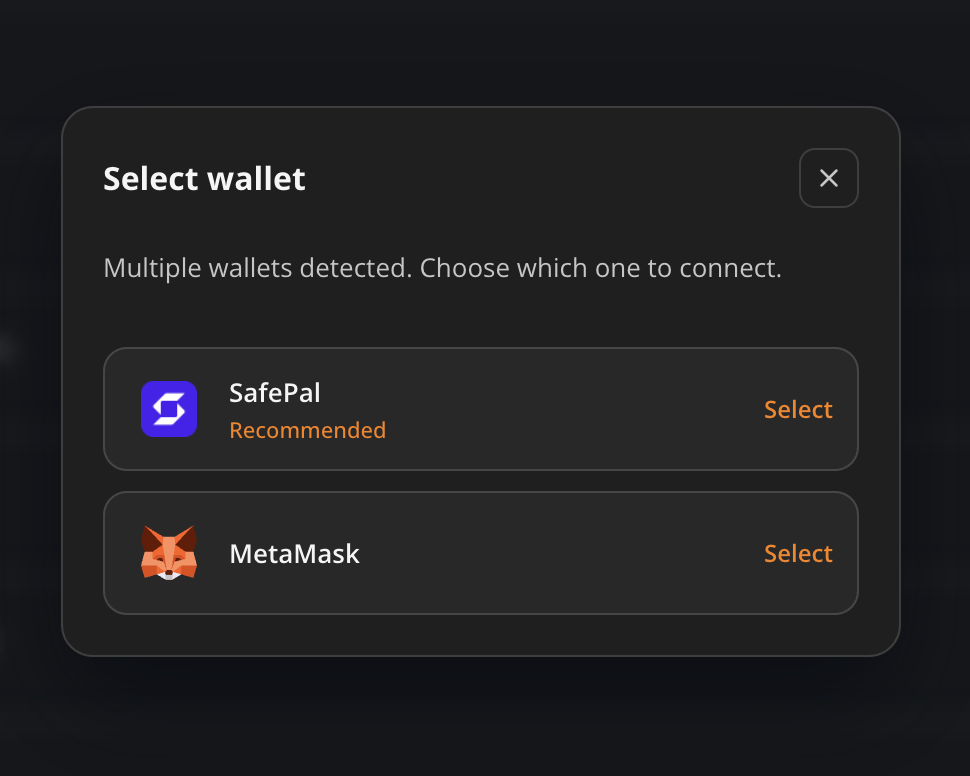
MoveQuest’s new wallet connection interface detects when multiple compatible wallets are available and lets you choose which one to connect.
Instead of your browser deciding which wallet gets the connection request, you make the choice.
For example, if you have SafePal and MetaMask available, MoveQuest can show both options directly on the connection screen. Simply select the wallet you want to use and continue.
No More Wallet Extension Shuffle
For existing users, this is likely the biggest improvement.
You should no longer have to rearrange your browser extensions just to access MoveQuest with a different wallet.
Keep your wallets installed. Keep them available. Choose the one you want when you connect.
It may sound like a small change, but removing this friction becomes increasingly important as MoveQuest prepares to onboard users with different wallets, devices, and levels of Web3 experience.